Is your HP laptop acting up? Maybe it’s running slow. Maybe the screen is cracked. Maybe it won’t even turn on. Whatever the problem, you need help fast. That’s why so many people search for an HP laptop repair center near me every single day.
In this guide, we will walk you through everything you need to know. You will learn how to spot laptop problems early. You will learn what a good repair shop looks like. And you will learn exactly how to choose the right repair shop for your needs.
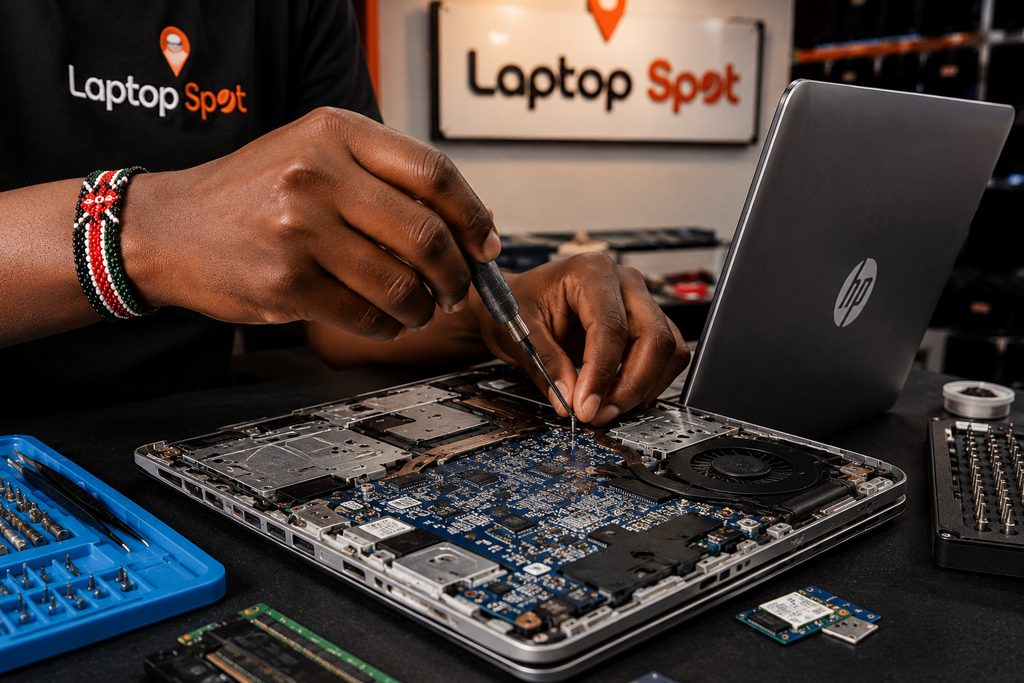
Let’s get started.
Why Your HP Laptop Needs Regular Care
Laptops are built to last. But they still need care. Dust builds up inside. Batteries wear down. Software slows over time. If you ignore small issues, they often turn into big ones.
That’s why it helps to know a trusted local repair shop before you actually need one. Waiting until your laptop dies can leave you stuck without options. Planning ahead saves time and stress.
Common Signs Your HP Laptop Needs Repair
Not sure if your laptop needs professional help? Here are some common warning signs.
- The laptop takes a long time to start up
- The battery drains very fast
- The screen flickers or shows lines
- The laptop overheats during normal use
- Strange noises come from the fan or hard drive
- The keyboard keys stick or don’t respond
- The laptop shuts down on its own
- Error messages pop up often
If you notice any of these signs, it’s time to search for an HP laptop repair center near me. Fixing small problems early can save you money later.
Common HP Laptop Problems People Face
HP laptops are reliable machines. But like any device, they can run into trouble. Here are some of the most common issues.
1. Screen Damage
Cracked or broken screens are common. Drops and accidents happen. A professional shop can replace the screen quickly.
2. Battery Issues
Old batteries lose their charge fast. Some batteries even swell up. This is dangerous and needs quick attention.
3. Overheating
Dust and blocked vents cause overheating. This can slow your laptop or shut it down completely.
4. Slow Performance
A slow laptop is often caused by a full hard drive or too many background programs. Sometimes a hardware upgrade is needed.
5. Keyboard and Touchpad Problems
Spilled liquids or daily wear can damage keys and touchpads. These parts often need full replacement.
6. Software and Virus Issues
Viruses and corrupted software can cause crashes. A repair center can clean and restore your system safely.
Whatever the issue, a good HP laptop repair center near me can handle it all under one roof.
Why Choose a Local Repair Shop
You might wonder why a local shop is better than sending your laptop away. Here are some good reasons.
Faster service. Local shops don’t need shipping time. You often get your laptop back the same day or within a few days.
Personal support. You can talk to a real technician face to face. This makes it easier to explain the problem.
Lower cost. Local shops often charge less than big service centers, since there are no shipping fees.
Trust and reviews. You can check local reviews and even ask friends or family for recommendations.
This is why searching for a nearby repair shop is such a smart first step. It puts trusted help right in your neighborhood.
What to Look for in an HP Laptop Repair Center Near Me
Not every repair shop is the same. Some are better than others. Here’s what to check before you choose one.
1. Experience with HP Laptops
Not all technicians know HP models well. Ask if the shop has experience specifically with HP hardware and software.
2. Genuine Parts
Always ask if the shop uses genuine or high-quality replacement parts. Cheap parts may fail quickly.
3. Clear Pricing
A good shop tells you the price before starting work. Avoid places that are unclear about costs.
4. Warranty on Repairs
Trustworthy shops offer a warranty on their work. This protects you if the same problem happens again.
5. Quick Turnaround Time
Ask how long the repair will take. Many simple repairs should not take more than a day or two.
6. Good Reviews
Check online reviews before booking. A reliable HP laptop repair center near me will have plenty of positive feedback from real customers.
DIY Repair vs Professional Repair
Some people try to fix laptops themselves. This can work for very simple issues, like clearing cache files or restarting the system.
But for anything involving hardware, it’s best to leave it to professionals. Opening a laptop without training can cause more damage. It can also void your warranty.
A trained technician at a professional repair shop has the tools and knowledge to fix the issue the right way. This saves you time and avoids costly mistakes.
How Much Does HP Laptop Repair Cost?
Repair costs depend on the problem. Here’s a rough idea of what to expect.
| Repair Type | Estimated Cost Range |
|---|---|
| Screen replacement | Moderate |
| Battery replacement | Low to moderate |
| Keyboard replacement | Low to moderate |
| Motherboard repair | High |
| Virus removal / software fix | Low |
| Fan or cooling repair | Low to moderate |
Prices can vary by location and laptop model. It’s always best to ask for a quote before agreeing to any repair. A trusted HP laptop repair center near me will give you a clear estimate upfront.
How Repair Centers Diagnose Laptop Problems
Ever wondered what happens after you drop off your laptop? Good shops follow a clear process. Knowing these steps can help you understand what you’re paying for.
Step 1: Initial inspection. The technician checks the outside of the laptop. They look for cracks, dents, or liquid damage.
Step 2: Power and boot test. They turn the laptop on to see how it behaves. This helps spot startup or battery issues right away.
Step 3: Software diagnostics. Special tools scan the hard drive, memory, and operating system for errors or viruses.
Step 4: Hardware testing. Parts like the keyboard, screen, ports, and fan are tested one by one.
Step 5: Written estimate. Once the problem is found, you get a clear quote before any work begins.
Step 6: Repair and quality check. After the fix, the laptop is tested again to make sure everything works properly.
This step-by-step process is what separates a professional shop from a rushed, careless one. Always ask if the shop follows a structured diagnostic process like this.
Preparing Your Laptop Before Drop-off
A little preparation can make the repair process smoother. Here’s what to do before you hand over your laptop.
- Back up your important files to an external drive or cloud storage
- Note down your laptop’s model number and serial number
- Write down the exact problem you’re experiencing, including when it started
- Remove any personal accessories, like USB drives or SD cards
- Sign out of sensitive accounts if possible
- Bring your charger, since technicians may need it for testing
Taking these small steps protects your data and helps the technician work faster. It also means less back-and-forth communication, which can shorten repair time.
What Happens During Warranty Repairs
If your HP laptop is still under warranty, repairs may be free or discounted. Here’s what to keep in mind.
Check your warranty status. You can usually check this using your laptop’s serial number on the manufacturer’s website.
Use authorized service providers. Repairs done by unauthorized shops may void your warranty. Always confirm a shop’s authorization status before booking.
Keep your receipts. Proof of purchase may be needed to claim warranty service.
Understand what’s covered. Warranties often cover manufacturing defects but not accidental damage, like drops or spills.
If your laptop is out of warranty, a good independent repair shop can still offer fair pricing and reliable service, often at a lower cost than manufacturer repair centers.
Contact us to learn more on warranty
Red Flags to Watch Out For
Not every repair shop treats customers fairly. Watch for these warning signs before you commit.
- No written estimate or unclear pricing
- Pressure to pay upfront for the full repair before any diagnosis
- Reluctance to explain what’s wrong with your laptop
- No warranty offered on parts or labor
- Very few or no online reviews
- Long, vague turnaround times with no clear explanation
If you notice any of these red flags, it’s worth looking elsewhere. A trustworthy shop will always be transparent about pricing, timing, and the details of your repair.
Steps to Find the Right HP Laptop Repair Center Near Me
Follow these simple steps to find the best shop for your needs.
Step 1: Search online. Type “HP laptop repair center near me” into a search engine. Look at the top results and read reviews.
Step 2: Compare prices. Call a few shops and ask for repair estimates. Compare what they offer.
Step 3: Ask about parts. Confirm they use genuine or high-quality parts.
Step 4: Check the warranty. Make sure they offer a guarantee on their repair work.
Step 5: Read customer reviews. Look for shops with consistent positive feedback.
Step 6: Visit if possible. A quick visit can help you judge the shop’s professionalism.
Taking these steps ensures you pick a dependable HP laptop repair center near me instead of settling for the first option you find.
Questions to Ask Before Booking a Repair
Before you hand over your laptop, ask these questions.
- How long have you been repairing HP laptops?
- Do you use original HP parts?
- What is the estimated cost and time for repair?
- Do you offer a warranty on the repair?
- Can I get a written estimate?
Asking these questions helps you avoid surprises. It also shows you’re dealing with a professional HP laptop repair center near me that values transparency. Laptop Spot is the best know more about us.
Tips to Keep Your HP Laptop Running Longer
Once your laptop is repaired, take these steps to avoid future issues.
- Clean the vents and keyboard regularly
- Avoid eating or drinking near your laptop
- Use a cooling pad if your laptop runs hot
- Keep your software updated
- Back up your files often
- Use a laptop bag when traveling
Good habits can reduce how often you need to visit a repair shop.
When to Repair vs When to Replace
Sometimes a laptop is too old or too damaged to fix. Here’s how to decide.
Repair if:
- The laptop is less than 4 years old
- The repair cost is much lower than a new laptop
- Only one part is damaged
Replace if:
- The laptop is very old and slow
- Multiple parts are failing at once
- Repair costs are close to the price of a new laptop
A good technician at a trusted repair shop will always be honest with you. If replacement is the smarter choice, they should tell you.
Learn more about Hp regulation from here
On-Site Repair vs In-Store Repair
Some shops offer on-site or pickup service. This means a technician comes to your home or office to fix simple issues.
On-site repair works well for:
- Software troubleshooting
- Virus removal
- Minor settings adjustments
- Data backup and transfer
In-store repair is better for:
- Screen replacement
- Motherboard repair
- Keyboard or battery replacement
- Any issue that needs special tools
If your problem is simple, on-site service can save you a trip. But for hardware issues, dropping off your laptop at a shop is usually faster and safer, since technicians have full access to tools, parts, and a clean workspace.
Trust the Experts for Your HP Laptop
Your laptop holds important files, photos, and memories. It deserves careful handling. That’s why choosing the right HP laptop repair center near me matters so much.
Don’t wait until small problems become big ones. Get your laptop checked at the first sign of trouble. A good repair center will save you time, money, and stress in the long run.
For official HP support resources and troubleshooting guides, you can also visit HP’s official support page. It’s a helpful place to check warranty details and find authorized service options.
If you’d like to book a checkup or ask a question, feel free to contact our team anytime. You can also browse our laptop repair services to see everything we offer.
Frequently Asked Questions
1. How do I find a reliable laptop repair shop nearby? Search online, check reviews, compare prices, and ask about warranties before booking.
2. Is it expensive to repair an HP laptop? Cost depends on the issue. Simple fixes are cheap. Major hardware repairs cost more.
3. How long does a typical repair take? Most repairs take one to three days, depending on parts and the type of damage.
4. Can I repair my HP laptop myself? Simple software issues can sometimes be fixed at home. Hardware problems should go to a professional.
5. Do repair shops use genuine HP parts? Good shops do. Always ask before agreeing to a repair.
6. Will I lose my files during a repair? Most repairs don’t affect your files, but it’s still smart to back up your data before drop-off, just in case.
7. Should I repair or replace an old laptop? If the laptop is under four years old and only one part is broken, repair is usually the smarter choice. If it’s very old or has multiple issues, replacing it may save money in the long run.
8. Can a repair shop fix water damage? Yes, in many cases. The sooner you bring it in after a spill, the better the chances of a full recovery.
9. Is it safe to buy a refurbished HP laptop instead of repairing mine? It can be a good option if your current laptop is beyond reasonable repair. Just make sure the refurbished unit comes with a warranty.
Final Thoughts
Laptop problems can be stressful, but they don’t have to be. With the right help, your HP laptop can be fixed quickly and safely. Keep this guide handy the next time you search for an HP laptop repair center near me, and you’ll know exactly what to look for.
A trustworthy shop will offer fair prices, genuine parts, and honest advice. That’s the kind of service every laptop owner deserves.
For more tips on device care, check out this general guide to laptop maintenance from PCMag to keep your machine running smoothly between repairs.